

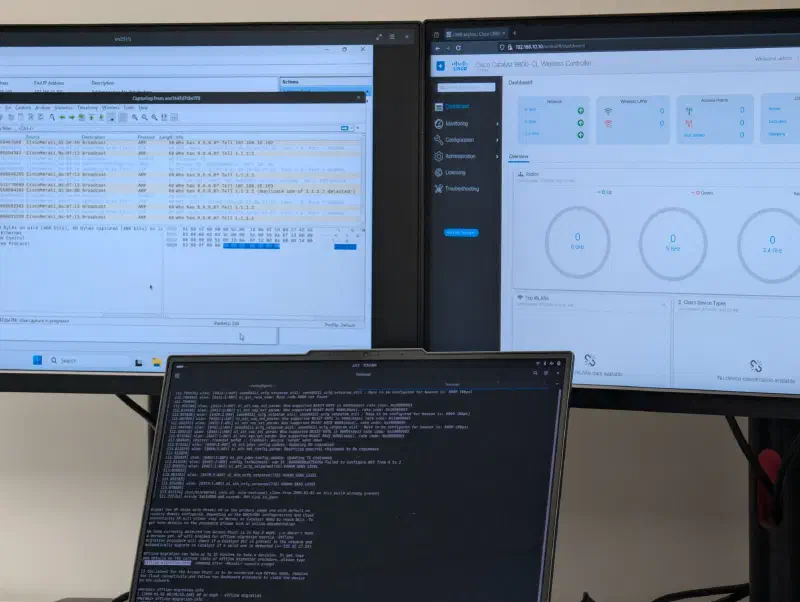
the cw917x ap series came out end 2k2412 w/ wi-fi 7 + a global-use sku: at first boot (out of box || post factory reset), a meraki “day 0” “guap” algorithm decides if the ap runs the meraki || the catalyst software3
for this cw917x guap global use ap onboarding4 software, cisco added an extension to the dhcp option 43 (the f3) && removed the ability to instruct commands via cli (only a offline-migration-info command is available)3
the c9k8 must run ios-xe 17.15.2 || higher5. licensing moved to the “cisco networking subscription” (wireless essentials && advantage, not the “dna” ones anymore)6. c9k8 needs capwap-discovery onboarding all command on the ap join profile to accept broadcast discovery on the same subnet3
single global sku is not baked-in regulatory domain. country code needs to be resolved at runtime (gps, proximity ap that has one, migration || raf)37, else radios are down w/ -UN country code (unknown)
it took me days to join a cw9176i to a c9k8 wlc. wireshark traces, docs that miss parts (&& are mostly meraki oriented). so here are my findings, the troubleshooting && the lab i ran on my laptop
the setup#
here are the elements of my lab, i ran the vms on my laptop (ryzen 7 7840hs, 32gb, debian 13)
i used a meraki ms130-12x as a l2 sw w/ poe capability
my single rj45 nic (enxf4a80d5addf0) is dedicated to the lab, so internet goes through my room wi-fi (any default gw will do)
%%{init: {'theme':'dark'}}%%
graph TD
internet(("the global cat videos kingdom (internet)"))
subgraph laptop
wifi(wlan
personal wlan, cause i only have 1 rj45 nic)
virbr0(virbr0 libvirt nat
192.168.122.1/24)
br0(br0
10.0.0.2/24)
win["win server 2k25
(dhcp)
10.0.0.5"]
wlc[c9k8-cl
gi1 -> svi vlan999 192.168.122.10
gi2 -> svi vlan10 10.0.0.10]
end
sw("ms130-12x
no config, for poe only")
ap["cw9176i
10.0.0.101 (dhcp)
degraded @ 30w"]
clients[wi-fi clients
dhcp 10.0.0.100-150]

internet --- wifi
virbr0 -. nat masquerade .- wifi
wlc ---|virtio| virbr0
wlc ---|virtio| br0
win ---|virtio| br0
br0 ---|enxf4a80d5addf0 untagged| sw
sw ---|mgig 2.5g poe+ 30w| ap
ap .- clients
ap -. capwap dtls on udp 5246/5247 .- wlc
host prep#
checking kvm acceleration
grep -Ec '(vmx|svm)' /proc/cpuinfo      # 0 == unsupported, >=1 == supported (enabled in bios)
kvm-ok                                  # expect "KVM acceleration can be used" (package cpu-checker)
ls -l /dev/kvm                          # device must exist
lsmod | grep kvm                        # kvm_intel || kvm_amd loaded
packages i used specifically
you can also add the genisoimage package if you want to bootstrap the iosxe_config.txt file into the wlc
apt install -y --no-install-recommends \
  qemu-system-x86 qemu-utils libvirt-daemon-system \
  libvirt-daemon-config-network dnsmasq-base libvirt-clients \
  virtinst ovmf virt-viewer
add yourself to the appropriate groups to avoid using root for the actions regarding the vms
usermod -aG libvirt,kvm <your_user>
# log out && back in, then
groups  # should list libvirt + kvm
you can load the vhost_net (virtio network accelerator) kernel module w/o restarting like this + enable it at start
modprobe vhost_net && echo vhost_net | tee /etc/modules-load.d/vhost_net.confnetworking#
bridge br0 creation
nmcli connection add type bridge ifname br0 con-name br0
nmcli connection modify br0 ipv4.method manual ipv4.addresses 10.0.0.2/24
nmcli connection modify br0 bridge.stp no
it’s ok if br0 is not up, it will be when it will be in use
attaching the rj45 nic as a br0 port + bringing everything up
nmcli connection add type ethernet ifname enxf4a80d5addf0 master br0 con-name br0-port
nmcli connection up br0
nmcli connection up br0-port
look if br0 has the associated ip using ip addr show br0 && if your nic is attached to br0 using bridge link
win server 2k25#
you can download the latest virtio here && the c9k8 virtual iso here
i used a windows server for the dhcp server because various docs from cisco were using it && showing configuration pictures
virt-install \
  --connect qemu:///system \
  --name srv2k25 \
  --osinfo win2k25 \
  --cpu host-passthrough \
  --vcpus 2 \
  --memory 4096 \
  --boot uefi \
  --disk path=/var/lib/libvirt/images/srv2k25.qcow2,size=64,bus=virtio,format=qcow2,cache=none,discard=unmap,boot.order=2 \
  --disk path=/var/lib/libvirt/boot/<your_windows_iso_here>,device=cdrom,bus=sata,boot.order=1 \
  --disk path=/var/lib/libvirt/boot/<your_virtio_iso_here>,device=cdrom,bus=sata \
  --network bridge=br0,model=virtio,mac=52:54:00:2c:25:01 \
  --channel unix,target.type=virtio,target.name=org.qemu.guest_agent.0 \
  --graphics vnc \
  --video vga \
  --sound none
to manipulate the vms
# once you closed one, to reopen it
virt-viewer --connect qemu:///system --wait srv2k25
virsh -c qemu:///system list --all
# to delete it
virsh -c qemu:///system destroy srv2k25
virsh -c qemu:///system undefine srv2k25 --nvram
rm -f /var/lib/libvirt/images/srv2k25.qcow2
i installed windows, virtio drivers, setup ip (10.0.0.5), disabled the fw, enabled dhcp (Install-WindowsFeature DHCP -IncludeManagementTools)
config via dhcpmgmt.msc -> adding a scope && add options, or:
Add-DhcpServerv4Scope -Name "xeylou_wlab" -StartRange 10.0.0.100 -EndRange 10.0.0.150 -SubnetMask 255.255.255.0 -State Active
Set-DhcpServerv4OptionValue -ScopeId 10.0.0.0 -Router 10.0.0.2 -Force
going through the options in option 43
c9k8-cl#
for the access to the kingdom of cat pictures for the c9k8
virsh net-define /usr/share/libvirt/networks/default.xml
virsh net-autostart default
virsh -c qemu:///system net-start default
same as br0, it’s ok if it’s down while not in use. try it yourself, you can still ping its ip
&& the installation of the c9k8 vm8
virt-install \
  --connect qemu:///system \
  --name c9k8-cl \
  --virt-type kvm \
  --osinfo rhel8.0 \
  --cpu host-passthrough,cache.mode=passthrough \
  --vcpus 4,sockets=1,cores=4,threads=1 \
  --memory 8192 \
  --memballoon model=none \
  --import \
  --disk path=/var/lib/libvirt/images/C9800-CL-universalk9.26.01.01.qcow2,bus=virtio,format=qcow2,cache=none,io=native,discard=unmap \
  --network network=default,model=virtio,driver.name=vhost,driver.queues=4 \
  --network bridge=br0,model=virtio,driver.name=vhost,driver.queues=4 \
  --rng /dev/urandom,model=virtio \
  --graphics vnc \
  --console pty,target_type=serial
answer no to the initial configuration dialog, then write memory. after that, you can get the wlc directly in your terminal if you switch it to serial console
configure terminal
platform console serial
end
write memory
reload
then, you can connect to it using virsh --connect qemu:///system console c9k8-cl
check show clock. the ssc validity starts at generation time, a wlc living in the past == “certificate not yet valid” && dtls failures at ap join9
create your ssc wireless config vwlc-ssc key-size 2048 signature-algo sha256 password 0 Cisco123!10
click to see my wlc config
platform console serial
!
hostname c9k8-xeylou
!
boot-start-marker
boot-end-marker
!
!
aaa new-model
!
!
aaa authentication login default local
aaa authentication login CONSOLE none
aaa authorization exec default local
aaa authorization exec CONSOLE none
!
!
aaa session-id common
clock timezone CET 1 0
clock summer-time CEST recurring last Sun Mar 2:00 last Sun Oct 3:00
clock calendar-valid
vtp mode off
!
!
!
ip name-server 8.8.8.8
ip domain name xeyloulab.local
!
!
!
crypto pki trustpoint c9k8-xeylou_WLC_TP
 enrollment url http://10.0.0.10:80
 serial-number
 password 7 122A0A1B170200557878
 subject-name O=Cisco Virtual Wireless LAN Controller, CN=c9k8-xeylou_WLC_TP
 revocation-check crl
 rsakeypair RSA_c9k8-xeylou_WLC_TP
 hash sha256
 eku request server-auth client-auth
!
!
!
!
enable secret 9 $9$QuZUd.JceSh7OU$YnjgNYg3PNSQZ3uyGiTvpSR7BgsdA8FHeBJk7Z9V.N6
!
username admin privilege 15 secret 9 $9$NQ6K8TDoEjcNCE$/aacbSwRuDHXjd3rCr2mTwg6N5QxSccmsGM9CTN3wxY
!
!
vlan internal allocation policy ascending
!
vlan 10
 name WLAB
!
vlan 999
 name CAT_KINGDOM
!
!
interface GigabitEthernet1
 description nat-virbr0
 switchport access vlan 999
 switchport mode access
 negotiation auto
!
interface GigabitEthernet2
 description LAB
 switchport access vlan 10
 switchport mode access
 negotiation auto
!
interface Vlan1
 no ip address
 no ip proxy-arp
 shutdown
!
interface Vlan10
 description Wireless-Management
 ip address 10.0.0.10 255.255.255.0
 no ip proxy-arp
!
interface Vlan999
 description CAT_+_access
 ip address 192.168.122.10 255.255.255.0
 no ip proxy-arp
!
!
ip route 0.0.0.0 0.0.0.0 192.168.122.1
!
!
line con 0
 activation-character 13
 authorization exec CONSOLE
 login authentication CONSOLE
 stopbits 1
line vty 0 4
 activation-character 13
 length 0
 transport input ssh
line vty 5 15
 activation-character 13
 transport input ssh
!
!
wireless management interface Vlan10
!
!
wireless country FR
ap profile default-ap-profile
 capwap-discovery onboarding all
 no capwap-discovery public
 country FR
 description "default ap profile"
 ntp ip 0.0.0.0
 syslog host 255.255.255.255
 macsec replay-protection window-size 0
end
option 43#
option 43 vendor-specific information is an opaque byte string, the dhcp server stores && ships, && the ap parses. the parsing happens on the client: the option carries a sequence of tlv blocks (type, length, value), each ap walks the sequence, consumes the tlv it knows, ignores the rest11
option 43 isn’t the only discovery path, aps also try resolving cisco-capwap-controller.<local domain> (domain == dhcp option 15)12, && global-use aps have their onboarding equivalent. needs option 6 + 15 to work, so useless in my lab, the f1/f3 ip is already resolved
tested on both 17.15.4 && 26.01.01 wlc versions
overall:
| symptom | meaning |
|---|---|
| blinks red twice, loops | uplink validation failed (no gw / no ip / filtered) |
| 8 min of silence | meraki-first wait, bc no f3 |
| radios down, country -UN | regulatory domain unresolved |
f1 classic capwap discovery#
historical “241” (hex f1), read by every ap (including the c91xx) && by the “standard” offline-migration path of global-use ap11
its organization:
| field | size | value |
|---|---|---|
| type | 1 byte | f1 (241) |
| length | 1 byte | n * 4, where n == number of wlcs (04 for 1 wlc, 08 for 2) |
| value | n * 4 bytes | wlc ipv4s, raw hex |
e.g. for the wlc 10.0.0.10
(10 -> 0a, 0 -> 00, 0 -> 00, 10 -> 0a)
it would be: f1 (option) + 04 (length) + 0a 00 00 0a (ip in hex) => f1 04 0a 00 00 0a
the windows command is Set-DhcpServerv4OptionValue -ScopeId 10.0.0.0 -OptionId 43 -Value 0xF1,0x04,0x0A,0x00,0x00,0x0A
for 2 wlcs, replace the length by 08 && add the 2nd wlc ipv4 address in hex @ the end
the ap adds these ip to its capwap discovery list && unicasts discovery requests to them, starting w/ the 1st ip
f3 fast offline migration (fom)#
introduced w/ the cw917x guap firmware, same idea but extra byte3
| field | size | value |
|---|---|---|
| type | 1 byte | f3 (243) |
| length | 1 byte | n * 4 + 1 (bc of the mode byte) |
| value | n * 4 bytes | wlc ipv4s |
| mode | 1 byte | 01 == meraki, 02 == catalyst |
for the same 10.0.0.10 wlc, it would become:
f3 (option) + 05 (length) + 0a 00 00 0a (ip in hex) + 02 (mode) => f3 05 0a 00 00 0a 02
(Set-DhcpServerv4OptionValue -ScopeId 10.0.0.0 -OptionId 43 -Value 0xF3,0x05,0x0A,0x00,0x00,0x0A,0x02)
the f3 is processed right at dhcp time in the day 0 state, it skips the 8 min offline wait3. the ap validates the wlc target w/ an icmp ping (capwap probe as fallback; e.g. if icmp is filtered3). assuming it got a proper ip, a gateway (yes, even when the wlc sits on the same subnet, i swear) && nothing filtering. then flips persona && reboots on the given mode (02 catalyst, 01 meraki)13
w/o f3, the ap is meraki-first: it hammers 8.8.8.8 / 1.1.1.1 in loop to check for the meraki cloud. internet reachable == it joins meraki, even w/ a perfectly valid f1. the catalyst path only opens after a full 8 min offline wait3, + another 8 min per retry if it fails14
worth repeating: f3 only gets a chance if the state machine reaches it. no gateway in the scope (option 3) -> uplink validation fails (blink red twice) -> the ap loops forever without ever parsing f1 nor f3. ask me how i know (my take, bc it could never ever reach the meraki cloud, it refuses to read the f1/f3 either…)
so on the wire, f3 == two phases, two protocols: icmp pre-flip (the day 0 meraki code validating its target, cheapest check available), then capwap discovery post-flip (the freshly booted catalyst image doing the actual join). w/o f3, no ping at all: at the end of the 8 min the ap confirms the wlc directly w/ a capwap discovery/response exchange. the response carries the wlc software version, checked (>= 17.15) before migrating3. an icmp echo can’t carry a version, a discovery response can. && a classic c91xx never pings either, its capwap state machine simply has no icmp step9
concatenation#
both tlvs can live happily inside the same option 43
for our f1 && f3 examples, we could type
f1 04 0a 00 00 0a f3 05 0a 00 00 0a 02(Set-DhcpServerv4OptionValue -ScopeId 10.0.0.0 -OptionId 43 -Value 0xF1,0x04,0x0A,0x00,0x00,0x0A,0xF3,0x05,0x0A,0x00,0x00,0x0A,0x02)
&& both c91xx + cw917x aps could be on the same network
each ap reads its own tlv && skips the unknown one. the cleaner way: match the vendor class (option 60) in the dhcp discover && serve a different option 43 per family (“Cisco Wireless AP” for cw917x, “Cisco AP” for c91xx)113. for a lab, concatenation is enough, so i chose it
feeding the win dhcp server#
doing it by powershell, bc the gui binary editor once shipped 5e 00 on the wire instead of my string, sry windows but wireshark don’t lie
on infoblox, two clean ways:
- raw
vendor-encapsulated-options (43), type string, colon-separated hex, no quotes, bc quotes == ascii == the same trap again, so:f1:04:0a:00:00:0a:f3:05:0a:00:00:0a:02 - typed a custom option space w/ sub-option
241as array of ip-address (nios computes type + length for you, multi-wlc friendly) && sub-option243as string w/ payload0a:00:00:0a:02only. the trailing mode byte breaks the ip-array typing, so f3 stays hex
validation#
you can ask me for the full pcap, screenshots, wlc logs && ap console logs
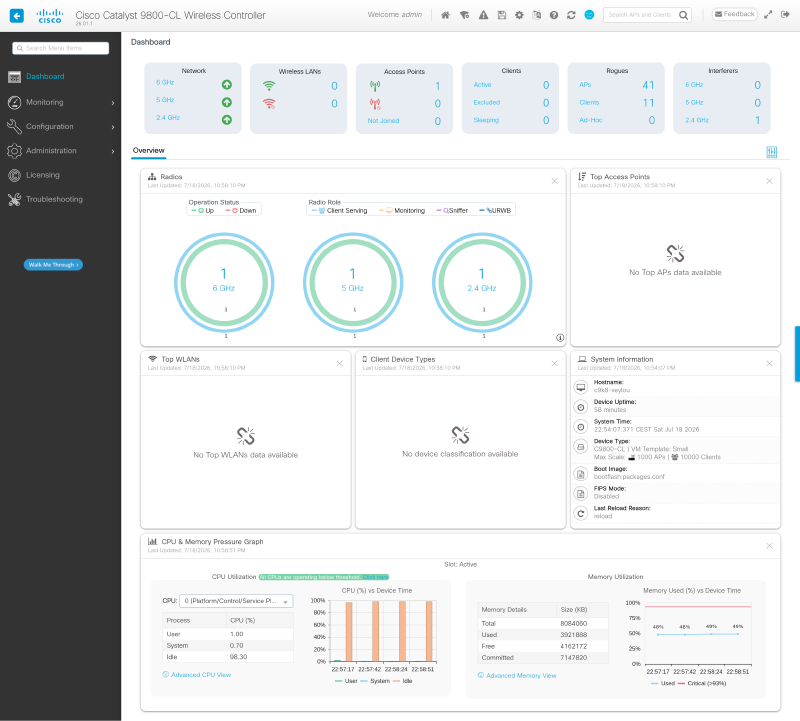
f1#
the dhcp server config
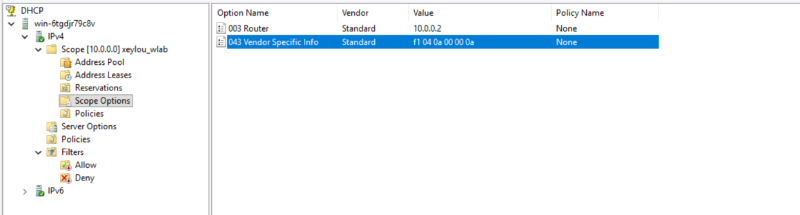
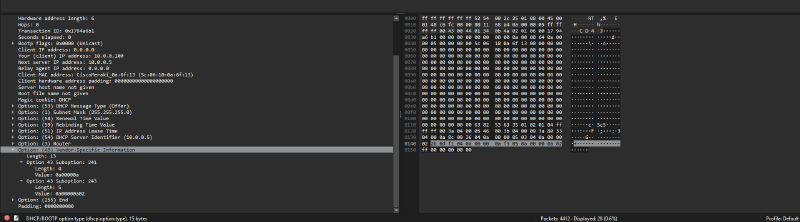
seeing the option 43
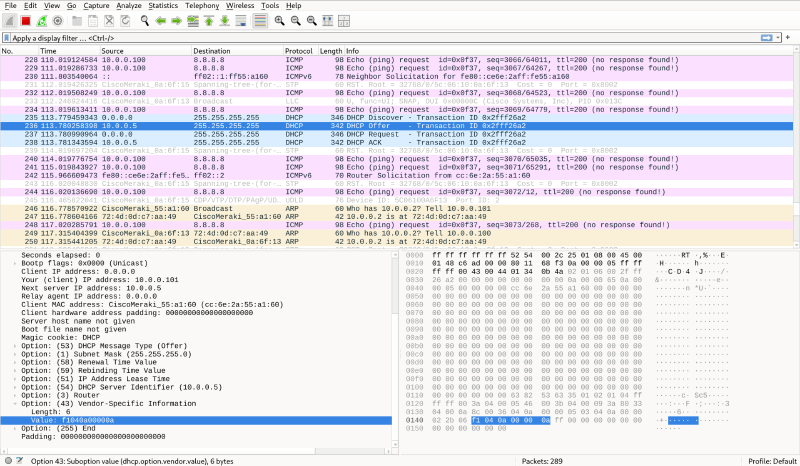
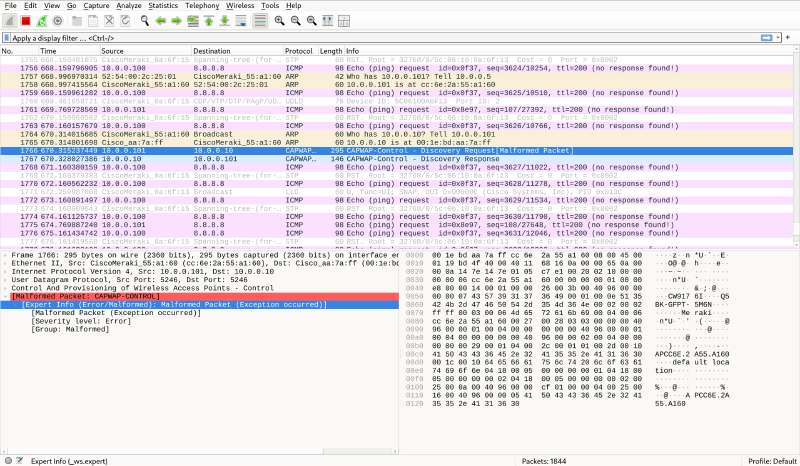
the capwap discovery request && its answer
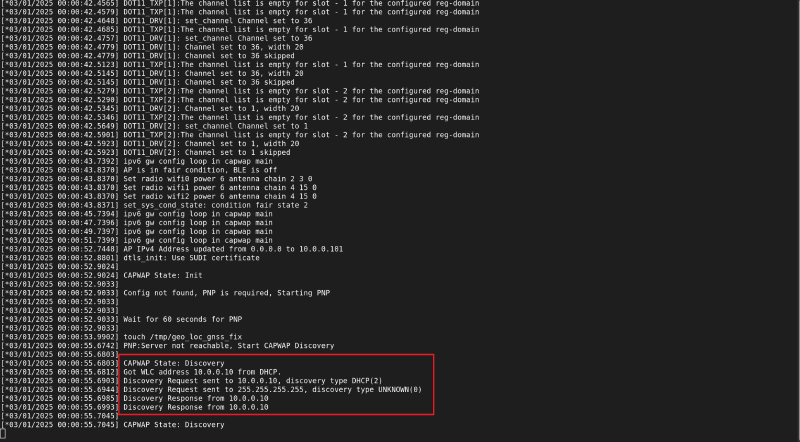
on the ap:
&& it joins it
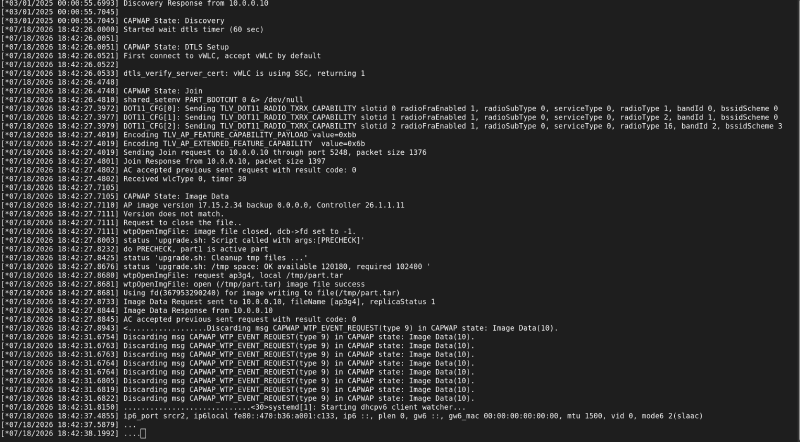
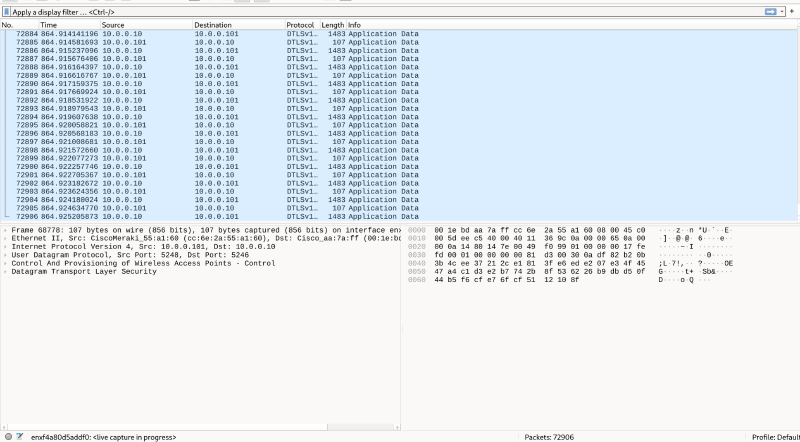
downloading its image
c9k8-xeylou#show ap summary
Number of APs: 1

CC = Country Code
RD = Regulatory Domain

AP Name                          Slots AP Model             Ethernet MAC   Radio MAC      CC   RD   IP Address                                State        Location
---------------------------------------------------------------------------------------------------------------------------------------------------------------------
APCC6E.2A55.A160                 3     CW9176I              cc6e.2a55.a160 2ce3.8e43.7e00 --        10.0.0.101                                Downloading  default location
then reload
Jul 18 18:45:42.563: %CAPWAPAC_SMGR_TRACE_MESSAGE-5-AP_JOIN_DISJOIN: Chassis 1 R0/0: wncd: AP Event: AP Name: APCC6E.2A55.A160 Mac: 2ce3.8e43.7e00 Session-IP: 10.0.0.101[5248] 10.0.0.10[5246] Disjoined Image Download Successthen after some times && one reboot
c9k8-xeylou#show ap summary
Number of APs: 1

CC = Country Code
RD = Regulatory Domain

AP Name                          Slots AP Model             Ethernet MAC   Radio MAC      CC   RD   IP Address                                State        Location
---------------------------------------------------------------------------------------------------------------------------------------------------------------------
APCC6E.2A55.A160                 3     CW9176I              cc6e.2a55.a160 2ce3.8e43.7e00 --   -UN  10.0.0.101                                Registered   default location
note the country code configuration:
Jul 18 18:53:35.517: %APMGR_TRACE_MESSAGE-5-AP_COUNTRY_CODE: Chassis 1 R0/0: wncd: AP Name APCC6E.2A55.A160 Mac: 2ce3.8e43.7e00 Model CW9176I Type PROXIMITY : No neighbors with valid country code
Jul 18 18:53:35.518: %APMGR_TRACE_MESSAGE-6-WLC_APMGR_INFO: Chassis 1 R0/0: wncd: Info : - 2ce3.8e43.7e00  Setting country code  to Access Point, Access Point will reboot and join back to WLC
&& it will refuse to use the 5 && 6 GHz
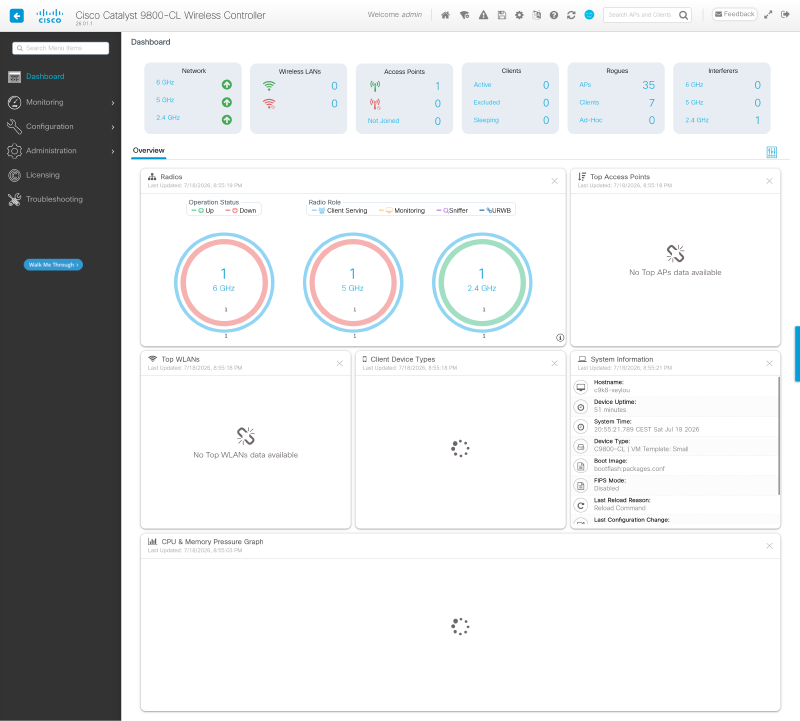
to do so:
ap profile default-ap-profile
 country FR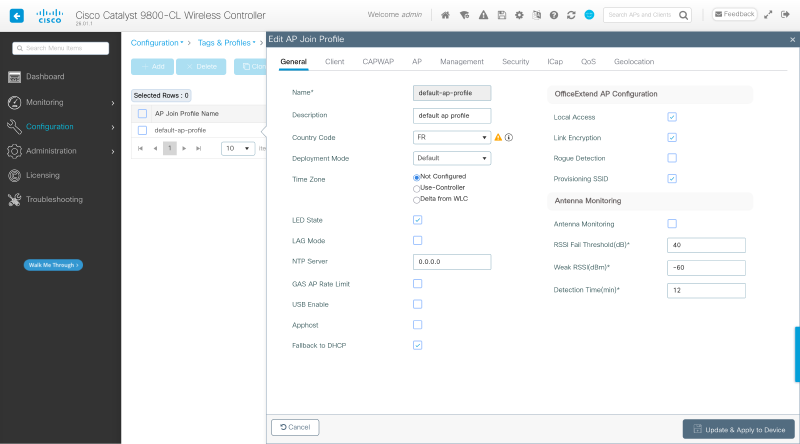
then you will have
Jul 18 18:57:28.229: %CAPWAPAC_SMGR_TRACE_MESSAGE-5-AP_JOIN_DISJOIN: Chassis 1 R0/0: wncd: AP Event: AP Name: APCC6E.2A55.A160 Mac: 2ce3.8e43.7e00 Session-IP: 10.0.0.101[5272] 10.0.0.10[5246] Disjoined Country changed in AP profilef3#


1min 38s seconds from the offer to the ping (capwap discovery right after), wheareas 8min 53s for the f1

then same process, reboot w/ Catalyst Mode Selected in the log
f1 + f3#
2 min between offer && first ping, 1min 64s for the reboot + capwap tunnel (f3 being used)
conclusion#
3 days of a blinking led had me create a lab for 13-bytes in a dhcp packet. but now i hope your cw917x will join your c9k8 within minutes
country code can be very long to resolve, even if you hard code it. so when your ap join your wlc, wait ~10 min to get it to have its 6 && 5 GHz to work
sources#
cisco wi-fi 7 press release, nov 12 2024 https://investor.cisco.com/news/news-details/2024/Cisco-Introduces-Intelligent-Secure-and-Assured-Wi-Fi-7-to-Transform-Employee-and-Customer-Experiences/default.aspx ↩︎
mrn-cciew unlocking wi-fi 7 with cisco aps https://mrncciew.com/2024/11/13/unlocking-wi-fi-7-with-cisco-aps/ ↩︎
cisco global use access points deployment guide https://www.cisco.com/c/en/us/td/docs/wireless/access_point/technical-reference/global-use-ap-dg.html ↩︎ ↩︎ ↩︎ ↩︎ ↩︎ ↩︎ ↩︎ ↩︎ ↩︎ ↩︎
cisco video global use ap onboarding “guapo”, fast offline migration https://video.cisco.com/detail/video/6371744843112 ↩︎
cisco wi-fi 7 products && licensing faq https://www.cisco.com/c/en/us/products/collateral/wireless/wi-fi-7-products-licensing-faq.html ↩︎
cisco networking subscription data sheet https://www.cisco.com/c/en/us/products/collateral/networking/software/networking-subscription-ds.html ↩︎
cisco cw9176 access point deployment guide https://www.cisco.com/c/en/us/td/docs/wireless/access_point/technical-reference/cw9176-dg.html ↩︎
cisco catalyst 9800-cl deployment guide (kvm) https://www.cisco.com/c/en/us/td/docs/wireless/controller/9800/technical-reference/c9800-cl-dg.html ↩︎
cisco understand the ap join process with the catalyst 9800 https://www.cisco.com/c/en/us/support/docs/wireless/catalyst-9120axe-access-point/221056-understand-the-ap-join-process-with-the.html ↩︎ ↩︎
cisco self-signed certificate workflow on catalyst 9800-cl https://www.cisco.com/c/en/us/td/docs/wireless/controller/9800/config-guide/trustpoints/b-configuring-trustpoints-on-cisco-catalyst-9800-series-controllers/c-workflow-to-configure-a-trustpoint-for-a-self-signed-certificate-on-catalyst-9800-cl.html ↩︎
cisco configure dhcp option 43 for lightweight access points https://www.cisco.com/c/en/us/support/docs/wireless-mobility/wireless-lan-wlan/97066-dhcp-option-43-00.html ↩︎ ↩︎ ↩︎
cisco cw9176i hardware installation guide, troubleshooting https://www.cisco.com/c/en/us/td/docs/wireless/access_point/cw917x/c9176I/b-hig-cw9176i/troubleshooting.html ↩︎
netprojnetworks cw9172 day-0 workflow, persona selection && fom https://www.netprojnetworks.com/understanding-cisco-cw9172-day-0-workflow-persona-selection-and-fast-offline-migration-fom-part-1/ ↩︎
cisco community dhcpv4 option 43 for fast offline migration https://community.cisco.com/t5/wireless/dhcpv4-option-43-for-fast-offline-migration/td-p/5281325 ↩︎